
Five Quick Tips to Ease iPhone and iPad Text Editing and Amaze Your Friends
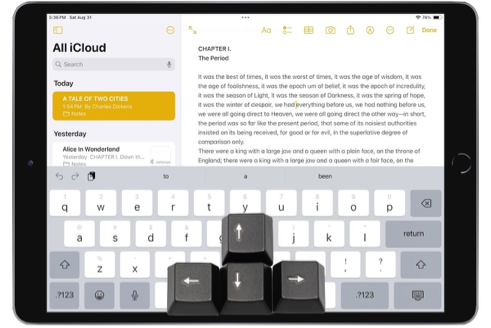
A friend recently expressed astonishment when she saw us using trackpad mode while editing text on an iPhone. (It works on the iPad, too!) So, even if you already know these tips, do your friends a favor and show them: Tap once to position the insertion point at the start or end of a word. […]
Apple Announces iPhone 16 Lineup, Apple Watch Series 10, and AirPods 4
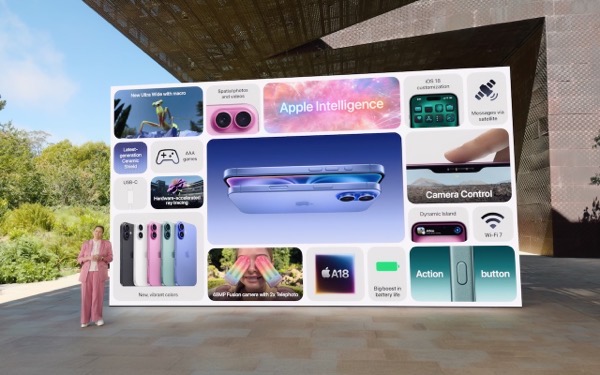
It’s September, which brings the annual Apple crops: new iPhones, Apple Watches, and AirPods. At its recent Glowtime event, Apple unveiled the new iPhone 16 lineup, Apple Watch Series 10, and AirPods 4, alongside smaller announcements about existing products. As always, the enhancements in the new products are evolutionary, making them attractive to anyone already […]
Energy Saver Can Shut Down Your UPS-Equipped Mac in a Power Outage

An uninterruptible power supply, or UPS, provides essential protection from power surges, spikes, brownouts, and outages. But if you’re not at your Mac when the power goes out, the UPS may run out of battery before you (or the power) return. Happily, if you connect your Mac to your UPS with a USB cable, macOS […]
When Should You Should Upgrade to macOS 15 Sequoia, iOS 18, iPadOS 18, watchOS 11, tvOS 18, and visionOS 2?
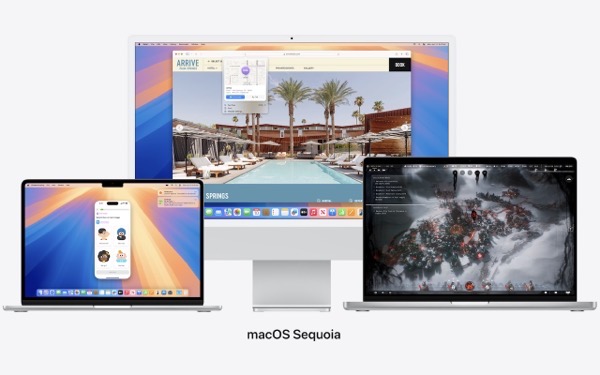
The calendar has flipped over to September, so Apple will soon release major upgrades for all its operating systems. iOS 18 and watchOS 11 will undoubtedly ship alongside new iPhone and Apple Watch models mid-month. iPadOS 18 is likely to accompany iOS 18, as are tvOS 18 and visionOS 2. Although Apple has sometimes delayed […]
Missed an Alert? Check Notification Center

iOS, iPadOS, and macOS all let you specify whether any given app should show no notifications, temporary banners, or persistent alerts: look in Settings > Notifications and System Settings > Notifications. Temporary banners appear briefly and then automatically disappear, which is appropriate for notifications requiring no acknowledgment. But what if you see a temporary banner […]
Make the Most of the Mac’s Videoconferencing Capabilities

A side effect of the pandemic is that online videoconferencing improved drastically. Video calls happened before 2020, but videoconferencing wasn’t an everyday activity for most people. Now, with many people working remotely or in a hybrid model, it’s a fact of business life. To support videoconferencing tools, Apple has extended macOS’s basic webcam and microphone […]
Having Trouble with a Public Wi-Fi Network’s Captive Portal Login Page?

When you connect to a public Wi-Fi network at an airport, hotel, coffee shop, or school, you may need to interact with a captive portal login page to be granted access to the network. It might require you to enter login credentials, ask for your name, or make you agree to terms of service. But […]
When Should You “Ignore Ownership” on an External Drive?

Under the hood, macOS relies on Unix, which is a multi-user operating system. That’s why a Mac can host multiple users who, as long as they don’t know each other’s passwords, cannot see each other’s files. To maintain each user’s privacy, macOS relies on permissions that specify who can do what with any given file […]
Be Careful When Scanning Unknown QR Codes

QR codes, those square, blocky codes you scan with your iPhone’s camera to load a Web page, have become ubiquitous. So much so that we seldom pause before scanning any QR code we see. But if you think about it, that’s the same as clicking random links in emails or texts, which is a terrible […]
Remember the Magnifier App When You Need to Read Tiny Text

Trying to make out a tiny serial number or some fine print you can barely read can be frustrating. Years ago, Apple added a magnifier mode to its accessibility options and turned the feature into a standalone app in iOS 14. You can find the Magnifier app in the Utilities folder in your App Library […]
