
After “Mother of All Breaches,” Update Passwords on Compromised Sites

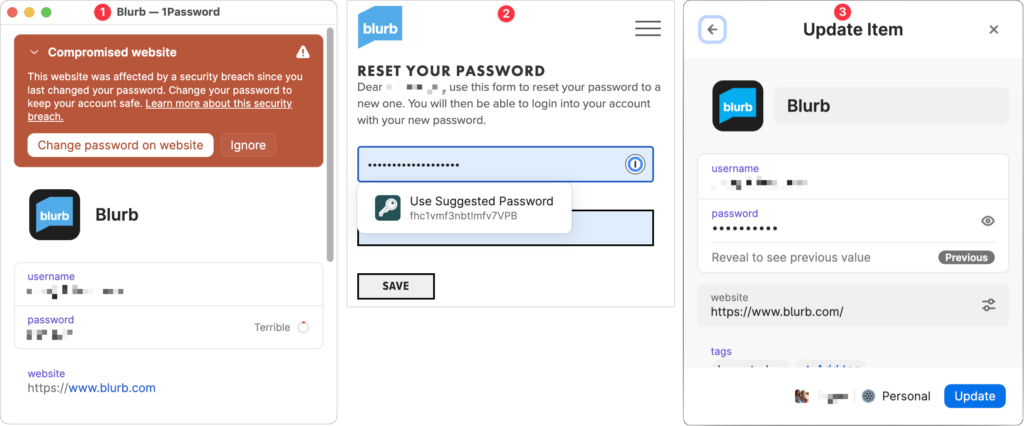
January’s big security news was the Mother of All Breaches, the release of a massive database containing 26 billion records built from previous breaches across numerous websites, including Adobe, Dropbox, LinkedIn, and Twitter. It’s unclear how much of the leaked data is new, but it’s a good reminder to update your passwords for accounts on compromised sites, especially those you reused on another site. Cybernews has a leak checker that reports which breached sites include your data. More generally, password managers often have a feature that checks your passwords against the Have I Been Pwned database of breaches and helps you change compromised passwords—1Password’s is called Watchtower, shown below. You can also search Have I Been Pwned directly. Don’t panic if your email address appears in numerous breaches because some of the theoretically compromised accounts may be defunct sites, trivial sites you used once 10 years ago, or duplicate password manager entries for a site whose password you already updated.
(Featured image by iStock.com/Prae_Studio)


Social Media: Worried about the “Mother of All Breaches” that has been making the rounds in security news? We share a leak checker that can tell you if your email address was involved and recommend that you update any compromised passwords.

More Insights

Tech Article

Not All Your Mac’s USB-C Ports Are the Same

We recently helped a client set up an external boot drive on a Mac mini for testing, but the installation kept failing near the end with vague errors. We tried different cables, swapped drives, and more, to no avail. On a hunch, we moved the SSD to a different USB-C port, and the installation completed […]

Read More »
Tech Tip

macOS 26.4 Warns Against Terminal-Based Malware Attacks

We’ve warned before about scams that trick users into pasting malicious commands into Terminal. Attackers create fake CAPTCHA pages—often resembling Cloudflare’s “are you a human” tests—that instruct visitors to open Terminal, paste a command, and press Return. Because the user executes the command themselves, macOS’s security protections are bypassed. Malwarebytes recently documented a macOS infostealer […]

Read More »
Tech Tip

Check Your Input Source If Your Mac Types Unexpected Characters

If your Mac starts typing unexpected characters—or rejects a password you know is correct—check to see if the Input Source menu appears in the upper-right corner of the screen, indicating that your Mac has more than one keyboard layout available for writing in other languages. Accidentally switching from the standard U.S. keyboard (or whatever you […]

Read More »
Tech Article

Understanding New MacBook Battery Charging Features

The just-released macOS 26.4 Tahoe introduced two battery-related features for MacBook users, helping them understand and control MacBook charging. A Slow Charger indicator now appears in the battery status menu and in Battery settings when your Mac is connected to a charger that isn’t delivering the minimum recommended wattage. More significantly, a new Charge Limit […]

Read More »
Tech Article

View Suspicious Documents Safely with Dangerzone

A standard piece of advice for staying safe online is to avoid opening attachments from people you don’t know or attachments that seem suspicious. It’s good advice, since PDFs and office documents can contain JavaScript and macros that present a security risk, or they could be maliciously crafted to take advantage of vulnerabilities in common […]

Read More »
Tech Tip

Create AI-Powered Playlists with iOS 26.4’s Playlist Playground

Apple Music subscribers running iOS 26.4 can use the new Playlist Playground feature to create AI-generated playlists tailored to any mood, genre, activity, or era. To try it on your iPhone, open the Music app, tap the Library tab, tap the + button, then tap Create New Playlist. Instead of manually adding songs, tap the […]

Read More »

If you are here and not sure how to proceed, please call us at 626-286-2350, and we would be happy to help you find a solution to your needs.