
After “Mother of All Breaches,” Update Passwords on Compromised Sites

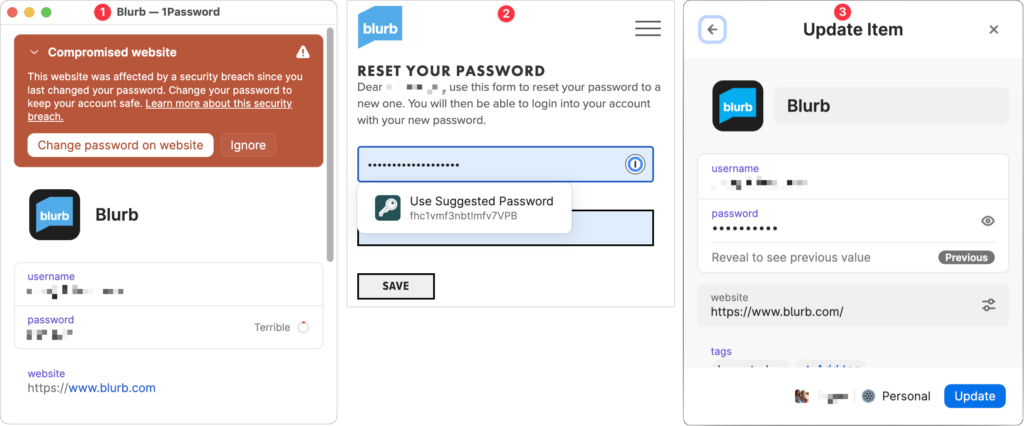
January’s big security news was the Mother of All Breaches, the release of a massive database containing 26 billion records built from previous breaches across numerous websites, including Adobe, Dropbox, LinkedIn, and Twitter. It’s unclear how much of the leaked data is new, but it’s a good reminder to update your passwords for accounts on compromised sites, especially those you reused on another site. Cybernews has a leak checker that reports which breached sites include your data. More generally, password managers often have a feature that checks your passwords against the Have I Been Pwned database of breaches and helps you change compromised passwords—1Password’s is called Watchtower, shown below. You can also search Have I Been Pwned directly. Don’t panic if your email address appears in numerous breaches because some of the theoretically compromised accounts may be defunct sites, trivial sites you used once 10 years ago, or duplicate password manager entries for a site whose password you already updated.
(Featured image by iStock.com/Prae_Studio)


Social Media: Worried about the “Mother of All Breaches” that has been making the rounds in security news? We share a leak checker that can tell you if your email address was involved and recommend that you update any compromised passwords.


More Insights

Tech Article

Keep Your IT Budget Working During a Slowdown

When business slows down, it’s tempting to reduce IT spending. But that approach often backfires, creating bigger problems—and larger bills—down the road. Beyond the productive work you accomplish on your Macs, your technology infrastructure enables you to communicate with clients, send invoices, manage schedules, and get paid. A downturn is precisely when you need those […]

Read More »
Tech Tip

New Apple Creator Studio Bundles Pro Apps

Apple has introduced Apple Creator Studio, a subscription bundle of Final Cut Pro, Logic Pro, Pixelmator Pro, Motion, Compressor, and MainStage, priced at $12.99 per month or $129 per year (with education pricing at $2.99 per month or $29.99 per year). The bundle also includes premium content and a few AI tools for the iWork […]

Read More »
Tech Article

Why Your Windows Reopen (Or Don’t) As You Expect

Have you noticed that when you restart your Mac or relaunch an app, your previous windows and documents sometimes reappear exactly as you left them, but at other times you’re greeted with a clean slate? This behavior is controlled by Resume, a technology introduced in OS X 10.7 Lion back in 2011. Resume automatically reopens […]

Read More »
Tech Tip

Make Finder Window Columns Resize to Fit Filenames

Column view in the Finder has an annoying tendency to either show overly wide columns that waste space or truncate long filenames, forcing you to drag a column divider to see more of the name. In macOS 26.1 Tahoe, Apple added an option to the Finder’s View Options window that automatically adjusts column widths to […]

Read More »
Tech Article

Be Very Careful with AI Agents!

AI agents—software that can take actions on your behalf using artificial intelligence—are having a moment. The appeal is obvious: imagine a robot butler that triages your inbox, manages your calendar, and handles tedious tasks while you focus on more important work. That’s the promise driving the recent surge in popularity of OpenClaw (formerly known as […]

Read More »

If you are here and not sure how to proceed, please call us at 626-286-2350, and we would be happy to help you find a solution to your needs.