
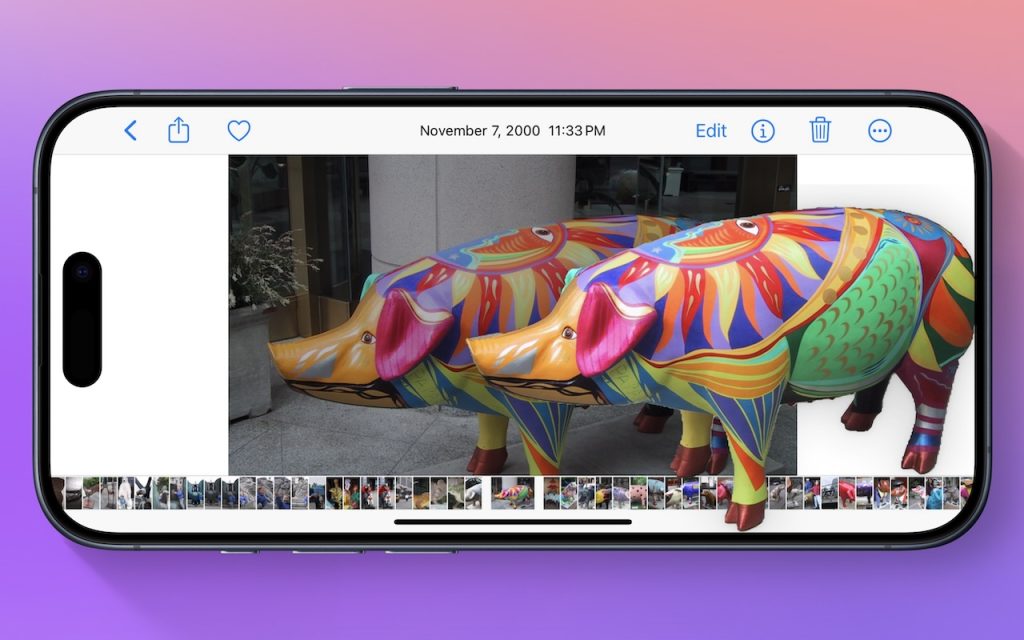
Lift Objects from Photos on the iPhone

Have you ever wanted to extract an object from a photo for use in another context? Starting with iOS 16 on a relatively recent iPhone, you can do that with many photos. In the Photos app, touch and hold the object, and if Photos can extract it, you’ll see a highlight run around its edges. Raise your finger, and a popover lets you copy the object, look up information about it, turn it into a sticker (in iOS 17), or share it. Or you can start dragging the object, switch apps with your other hand, and drop it into another app, like Messages. With Universal Clipboard, you can even lift an object on an iPhone, copy it, switch to Preview on your Mac, and choose File > New from Clipboard. File this one under Arthur C. Clarke’s Third Law, which states, “Any sufficiently advanced technology is indistinguishable from magic.”

(Featured image by Adam Engst)


Social Media: Starting with iOS 16, Apple made it possible to extract objects from photos. You can drag objects to other apps, copy them, turn them into stickers, and more.

More Insights

Tech Article

Automate Your Mac with Folder Action Scripts

Do you repeatedly find yourself wanting to do something in the Finder with every file of a certain type? Perhaps you regularly download files from a particular website that come in with a .txt extension, even though they’re CSV files that should have a .csv extension? Or maybe you want to rename files according to […]

Read More »
Tech Tip

Reminders (Finally) Adds Time Zone Support

Apple’s latest operating systems have eliminated a longstanding annoyance for frequent travelers: the lack of time zone support in Reminders. If you had set a reminder to alert you at 9 AM Eastern and then traveled from Virginia to California, your alert would go off at 6 AM, which is likely unhelpful and potentially sleep‑disrupting. […]

Read More »
Tech Article

Five Ways to Protect Against Forgetting Your Apple Account Password

One of the big wins of using a password manager is that you don’t need to remember or enter most passwords—the app does that for you. Even those passwords that must be entered manually can be looked up if you forget them. However, people who don’t use password managers regularly forget passwords and have to […]

Read More »
Tech Tip

Backups: Trust but Verify

It’s easy to assume your backup app—whether it’s Time Machine, Carbon Copy Cloner, Backblaze, Retrospect, or something else—is quietly doing its job. But it’s possible for a bug to corrupt backups or for a destination disk to fail silently, such that you can’t restore backed-up data. We’ve seen this happen! For peace of mind, set […]

Read More »
Tech Article

Don’t Miss Calls and Texts: How to Use New Phone and Messages Filtering

Spam is one of the many banes of modern existence. While we receive more email spam than anything else, interruptions from unwanted phone calls and text messages are even more annoying. Apple has added various features over the years to help control spam calls and messages, but none have completely solved the problem. The problem […]

Read More »
Tech Tip

Be Alert for Deepfake Phishing Scams

Phishing scams have entered a new, AI-powered phase and can now convincingly mimic real people. Attackers can generate fake voice or video deepfakes to impersonate CEOs authorizing urgent payments, IT staff requesting access, or family members needing help. If you receive a voice or video call from someone you know at an unknown number who […]

Read More »

If you are here and not sure how to proceed, please call us at 626-286-2350, and we would be happy to help you find a solution to your needs.